
Online shopping has become increasingly popular in recent years, and consumers constantly seek ways to save money while getting the best deals possible. One such way is by utilizing a price tracker, which allows users to monitor the price fluctuations of specific products and be alerted when there is a significant decrease. While there are various eCommerce price trackers available, one of the newest and most convenient options comes directly integrated into Google Search, the Google Price Tracker.
What is a Google Price Tracker?
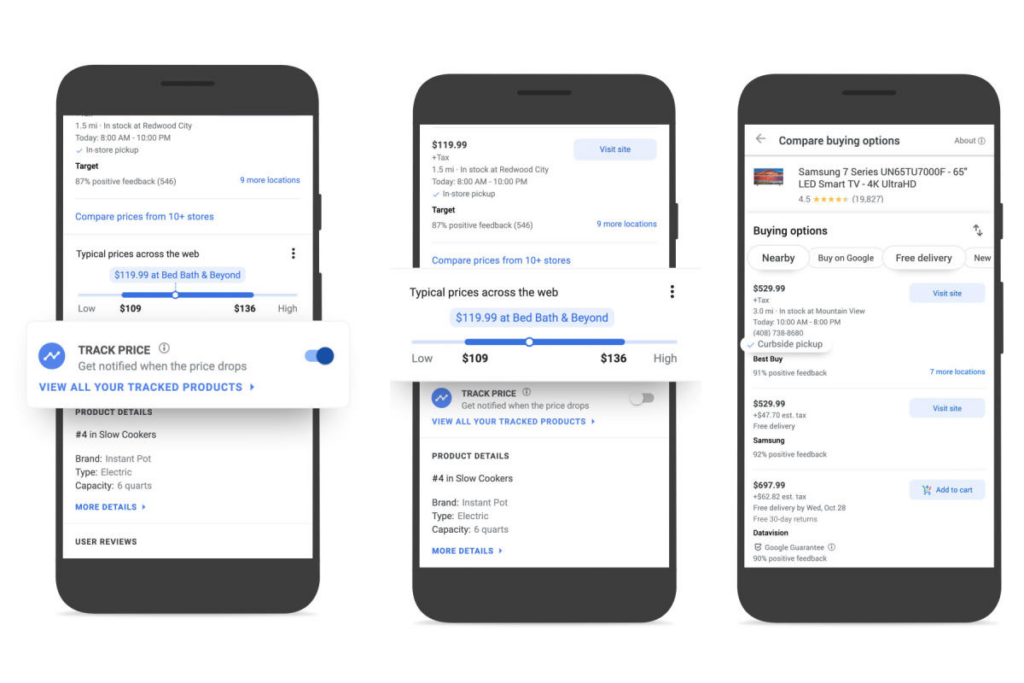
Image Source: Engadget
The Google Price Tracker enables users to monitor price changes for desired products automatically. When activated, the price tracker keeps tabs on the selected item and sends notifications whenever the price drops significantly. This handy tool eliminates the need for manual monitoring and ensures that users never miss out on a good deal. Moreover, since it is integrated directly into the application, no additional downloads or installations are required.
How Does Google Price Tracker Work?
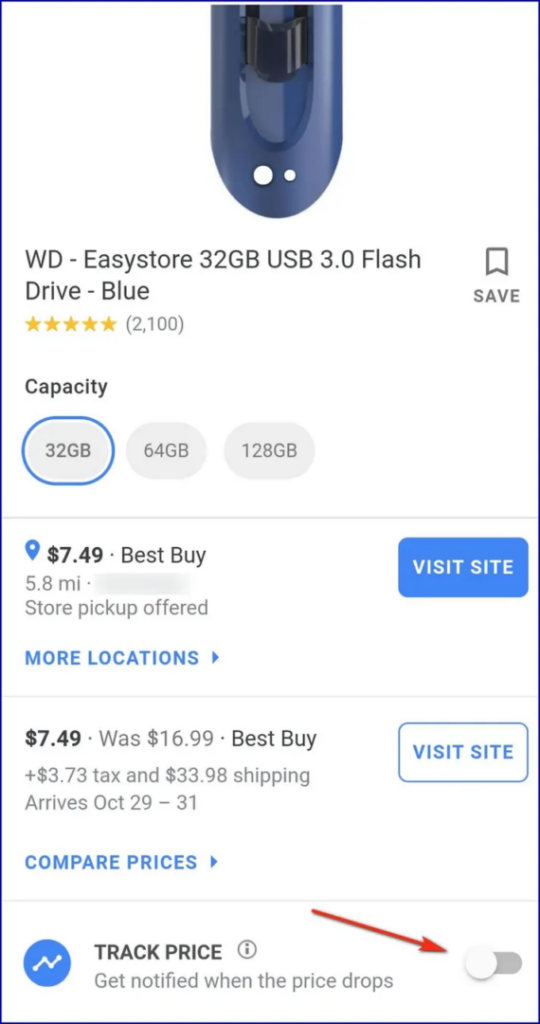
Image Source: Forbes
Using the Price Tracker by Google is quite straightforward. First, navigate to the product page of interest. If the price tracker determines that there is sufficient price history data available, a small icon will appear near the URL bar. By clicking on this icon, users can enable price tracking and set their preferred threshold for receiving notifications. Once enabled, the price tracker continuously monitors the product’s pricing and updates the user accordingly.
Top Features of the Google Price Tracker
Beyond merely tracking prices, the Price Tracker offers several other useful features designed to enhance the overall online shopping experience. These include:
Historical price data
Users can access detailed graphs displaying historical price trends for each product, making it easier to identify patterns and predict future price movements.
Comparison shopping
By comparing prices across multiple retailers, the price tracker helps ensure that users secure the lowest possible cost for their chosen item.
Coupon integration
The price tracker scours the internet for relevant discount codes and applies them automatically during the checkout process, further maximizing savings.
How to Use the Google Price Tracker: A Step-by-Step Guide
Using the Google Price Tracker is simple, but the exact steps can vary. Here’s a clear, step-by-step process for both desktop and mobile:
On Desktop (Google Chrome):
- Search for a Product: Go to Google and search for a specific product (e.g., “Sony WH-1000XM4 headphones”).
- Navigate to Shopping Tab: Click on the “Shopping” tab to see listings from various retailers.
- Find the Track Price Button: On product listings, look for a “Track price” button or a small price tag icon.
- Turn On Tracking: Click “Track price.” You’ll need to be signed into your Google account. You may be able to set a target price.
- Manage Alerts: You can view and manage all your tracked items by visiting your Google account’s “Your tracked products” page.
On Mobile (Google App or Chrome):
- Perform a product search in the Google app or browser.
- Scroll through the shopping results.
- Tap the “Track price” star icon on any product listing.
- You will receive notifications through the Google app or via email when the price drops.
Google Shopping Price History & Insights: Making Data-Driven Decisions
One of the most powerful features of the Google Price Tracker is access to historical price data. This isn’t just about knowing the current price; it’s about understanding the product’s price lifecycle.
When you view a product, you can often see a chart showing its price over the past weeks or months. This price history allows you to:
- Identify Seasonal Trends: See if the product typically goes on sale during certain times of the year (e.g., post-holiday sales, Black Friday).
- Determine a “Good” Price: Understand the typical price range, so you know if a current “deal” is truly exceptional or just average.
- Avoid Buying at a Peak: The chart visually warns you if you’re about to buy when the price is at a 90-day high.
For businesses, this price insight is invaluable for benchmarking your own prices against the market average and understanding competitor pricing cycles.
Why use Google’s Price Tracker?
There are several key benefits associated with the tool:
1. Convenience
With everything contained within your browser or the Google app, there is no need to search for, download, or manage external plugins or apps. The tool is seamlessly integrated into the platforms you already use daily for product search, eliminating friction and creating a unified shopping experience. There are no new accounts to create or complex settings to configure.
2. Time-saving
Manual monitoring of prices can be both tedious and time-consuming; the price tracker automates this task, freeing up valuable time for users. The Google Price Tracker automates this task completely, running 24/7 in the background. It frees you from the cycle of repeatedly checking product pages, allowing you to focus on more important things while it does the vigilant work for you.
3. Increased Savings
Access to real-time price alerts and comprehensive sales analysis empowers users to make informed purchasing decisions, ultimately leading to greater savings.
While this may seem limited to shoppers, this new feature can also help small businesses.
4. Data-Driven Decision Making
It’s not just about waiting for a drop; it’s about understanding the market. The historical price graphs answer the critical question: “Is this really a good deal?” By revealing seasonal trends and typical price ranges, you learn the best times to buy specific categories of products, transforming you from an impulse buyer into a strategic shopper.
5. Direct Access to Coupons and Discounts
The tool often scours the internet for you, surfacing relevant promo codes and automatic coupons directly on the product page or at checkout. This eliminates the need for you to hunt through multiple coupon sites, ensuring you capture the maximum possible discount without extra effort.
6. It’s Completely Free
Unlike many premium price tracking services, Google’s Price Tracker is entirely free to use. There are no subscription fees, tiered plans, or hidden costs. This makes advanced shopping intelligence accessible to everyone, from the casual buyer to the budget-conscious family.
7. Broad Retailer Coverage
Google aggregates data from a vast network of online retailers, from giants like Amazon and Walmart to smaller specialty stores. This gives you a comprehensive market view in one place, ensuring you don’t miss a better deal on a less familiar but reputable site.
Beyond Google: When You Need a Dedicated Price Tracking Tool
The Google Price Tracker is excellent for casual shoppers and simple business monitoring. However, for serious price monitoring at scale, businesses require a dedicated price tracker software. Here’s when you should consider a professional solution:
- Tracking Hundreds or Thousands of Products: Google’s tool is manual. Professional software automates tracking for entire product catalogs.
- Monitoring Specific Competitors: You need to track prices from specific retailers, not just the aggregate market view Google provides.
- Real-Time Repricing: For e-commerce sellers, professional tools can integrate with your platform to automatically adjust your prices in response to competitor changes.
- Advanced Analytics and Reporting: Go beyond simple history with dashboards that show market share, price positioning, and pricing rule performance.
- Tracking Additional Metrics: Professional tools also monitor stockouts, competitor promotions, and listing content changes, providing a 360-degree view of the competitive landscape.
1. Monitor Competitor Products
End-users and small business owners could use Google’s tracker to keep an eye on competitors’ products they carry. They can follow competitor pricing strategies over time, helping inform adjustments to their pricing schemes.
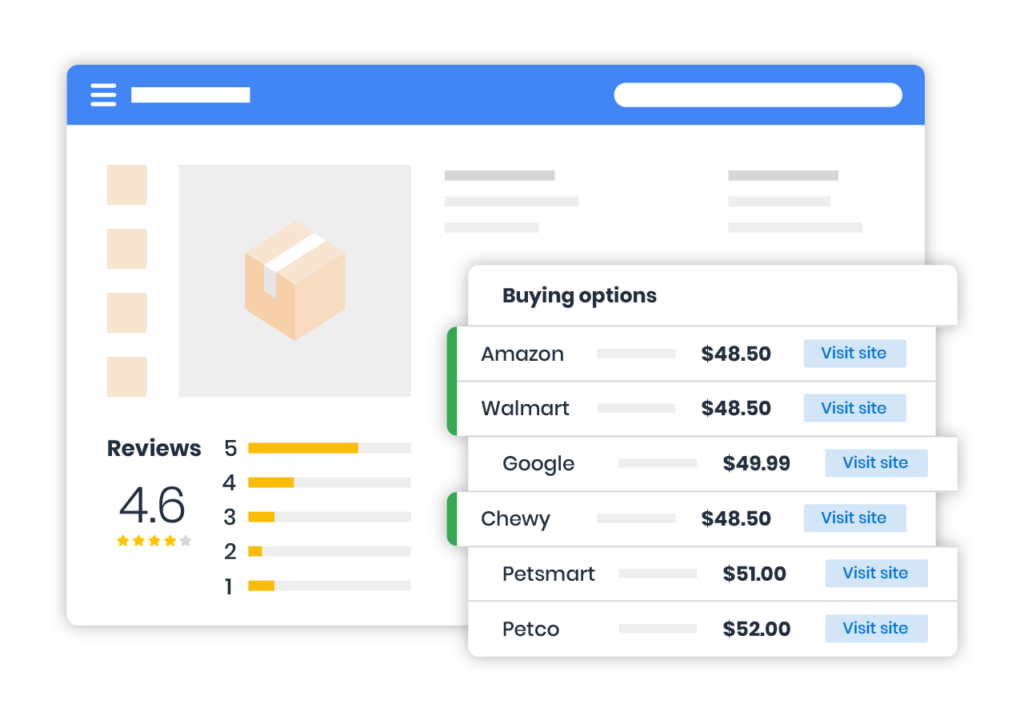
Image Source: FrigginYeah
2. Anticipate Market Trends
By observing the general trend of competitor pricing, end-users, and small businesses may gain insight into broader industry shifts or emerging trends. For instance, if competitors begin lowering prices consistently, it might indicate increased supply or reduced demand for certain goods.
3. Identify Opportunities
Sudden changes in competitor pricing could signal newfound market opportunities. A dramatic drop in a rival’s pricing strategy could signify a shift in focus, leaving room for others to fill potential gaps in the marketplace. Likewise, substantial increases in competitor pricing might suggest a chance to capture customers through aggressive promotions or attractive alternatives.
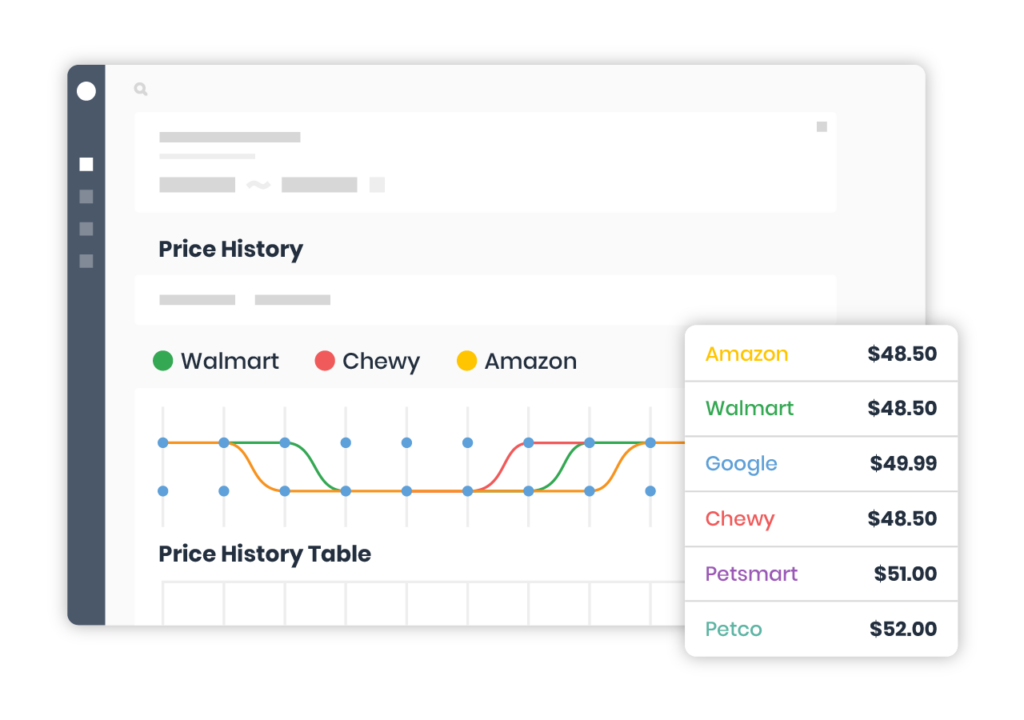
Image Source: Pinnaxis
4. Benchmark Performance
Small businesses can measure their performance relative to competitors using the price tracker. Regular comparisons between internal pricing structures and those of rivals provide valuable feedback regarding positioning and differentiation.
5. Optimize Sales Strategy
Based on the price tracking data gathered, companies can fine-tune their sales approach. By understanding the context around competitor pricing moves, organizations can adapt their selling tactics to better meet customer needs, boost conversion rates, and strengthen overall revenue streams.
6. Enhance Customer Experience
Knowledge of competitor pricing dynamics equips brands to educate their clients effectively. Providing accurate and timely pricing information alongside compelling value propositions fosters trust and credibility among prospective buyers, enhancing the overall customer experience.
7. Stay Updated on Industry News
Following competitor pricing through the Google Price Tracker encourages staying current with industry news. Companies that remain well-informed about market developments maintain a strategic advantage over less aware counterparts, ensuring long-term success and growth.
8. Analyze Seasonal Fluctuations
Observing seasonal variations in competitor pricing can reveal recurring trends and cycles, allowing end-users and small businesses to optimally plan inventory management and marketing initiatives throughout the year.
9. Supply Chain Optimization
Companies involved in manufacturing or distribution can rely on Google’s Tracker to monitor component or raw material prices. By staying informed about price movements, businesses can negotiate better contracts with suppliers or switch to alternative sources if necessary, ultimately reducing production expenses.
10. Stock Management
Monitoring price drops and increases can help businesses anticipate demand fluctuations and manage inventory levels effectively. When specific items experience sudden spikes in popularity due to lower prices, companies can prepare by increasing stock quantities to meet consumer needs and capitalize on the trend.
11. Product Development
Analyzing historical price trends can assist businesses in identifying high-demand and profitable niches within their industry. By focusing development efforts on these areas, companies can create innovative offerings tailored to customers’ preferences while maximizing revenue potential.
Conclusion on Google Price Tracker
While Google’s price tracking tool definitely helps the shopper, its benefits and implementation can extend to small businesses too.
With price data available in real-time, a small business without a large product array or budget for a premium price monitoring tool can maintain a strong foothold in their respective markets by analyzing this data.
Adopting cutting-edge technologies to facilitate smarter decision-making is essential for businesses to thrive and the Google Price Tracker offers precisely that – actionable intelligence for informed choices.
Take Control of Your Pricing Strategy! Discover how 42Signals can transform your business with real-time pricing insights. Schedule a Demo Today.
Frequently Asked Questions
Is the Google Price Tracker accurate and reliable?
A: Google’s data is highly reliable as it aggregates information directly from retailer product feeds and its own web crawling. However, occasional discrepancies can occur due to rapid price changes, regional variations, or temporary glitches on retailer sites. It’s always a good practice to double-check the final price on the retailer’s website before purchasing.
Can I track prices from any website, or only those on Google Shopping?
A: The native tracker primarily works with products listed in the Google Shopping tab. It does not track prices on every website on the internet. For broader coverage across niche or specific retailer sites, a dedicated price tracking extension or software is often necessary.
How quickly will I be notified of a price drop?
A: Google’s alerts are typically very fast, often within hours of a price change. However, it is not instantaneous real-time monitoring. For businesses that require lightning-fast price change alerts (e.g., for competitive repricing), a professional monitoring tool is recommended.
Does the price tracker work on all types of products?
A: It works best on standardized products with clear identifiers, such as electronics, books, home goods, and brand-name items. It is less effective for unique, handmade, or custom products that aren’t widely listed across multiple retailers.
Can I use the Google Price Tracker on my iPhone or Android device?
A: Yes, the feature is fully supported on mobile devices. You can track prices using the Google app (on both iOS and Android) or through the Chrome mobile browser. The process of tapping the “Track price” star icon is the same.