

** TL;DR ** A price tracker for any website monitors product prices automatically by combining web scraping, headless browser rendering, and rotating proxy networks. For developers, this guide includes a working Python example and a step-by-step build guide. For businesses, it covers the real cost of building vs buying, the best tools for consumer and business use, and how competitor price monitoring at scale gives ecommerce brands a strategic edge. The short verdict: for most businesses, buying a service delivers better ROI than building, but understanding how the technology works helps you evaluate vendors and choose the right tool.
A price tracker for any website solves one of the most persistent problems in ecommerce — whether you are a consumer waiting for a price to drop, a developer building a monitoring system, or a brand that needs to track competitor pricing across thousands of SKUs. Instead of manually checking prices, an automated tracker visits product pages continuously, extracts the price data, and alerts you the moment something changes.
But have you ever stopped to wonder how these tools actually work? How can a single piece of software monitor the cost of a laptop on one site, a specific book on another, and a flight on a third? The answer is far more fascinating than a simple refresh button. It is a sophisticated dance of technology designed to mimic human behavior, overcome digital barriers, and deliver accurate, timely data.
How a Price Tracker for Any Website Works (and How to Build One)

Image Source: Ali Helper
At its core, a price tracker is built on a foundation of web scraping and data extraction. Think of it as a highly efficient, automated digital assistant. Instead of you manually looking at a webpage, reading the price, and noting it down, a software program does this for you.
But it is not as simple as it sounds. When you type a URL into your browser, the browser sends a request to the website’s server. The server responds by sending back data, mostly in the form of HTML code, which your browser then beautifully renders into the webpage you see. Web scraping is the process of a computer program making that same request and then “reading” the returned HTML code to find the specific piece of information it needs, like the price.
This process of data extraction is the fundamental first step. The program needs to know exactly where to look in that sea of code. Developers use identifiers, often based on HTML elements and classes, to pinpoint the price tag, much like using a map coordinate to find a specific treasure. This allows a powerful price tracker for any website to locate and retrieve the price data reliably, as long as the website’s basic structure remains the same.
Ready to Take the Next Step?
See how our solutions can help you achieve your goals and drive measurable results.
How to Build a Price Tracker: A Step-by-Step Guide
Building your own universal price tracker is a complex but achievable project. Here’s a step-by-step breakdown:
Step 1: Choose Your Tech Stack
- Programming Language: Python is the industry standard due to its rich ecosystem of scraping libraries (BeautifulSoup, Scrapy, Selenium).
- Headless Browser: Use Puppeteer (Node.js) or Selenium to render JavaScript-heavy sites.
- Database: Store historical price data in a SQL (PostgreSQL) or NoSQL database.
- Infrastructure: You’ll need servers to run your scrapers, manage proxies, and host the application.
Step 2: Develop the Core Scraper
- Write code to fetch web pages and extract price data using CSS selectors or XPath.
- Implement error handling for site changes, timeouts, and missing elements.
- Build parsers to clean data ($1,299.99 → 1299.99) and detect stock status.
Step 3: Overcome Anti-Bot Defenses
- Proxy Rotation: Integrate a rotating proxy service (residential proxies are best) to avoid IP bans.
- Request Throttling: Add random delays between requests to mimic human behavior.
- Headers & Fingerprints: Rotate user-agents and manage browser fingerprints.
- CAPTCHA Handling: Implement CAPTCHA solving services (like 2Captcha) or advanced evasion techniques.
Step 4: Build the Alert & Storage System
- Create a database schema to store products, prices, and timestamps.
- Build logic to compare new prices with previous ones and trigger alerts.
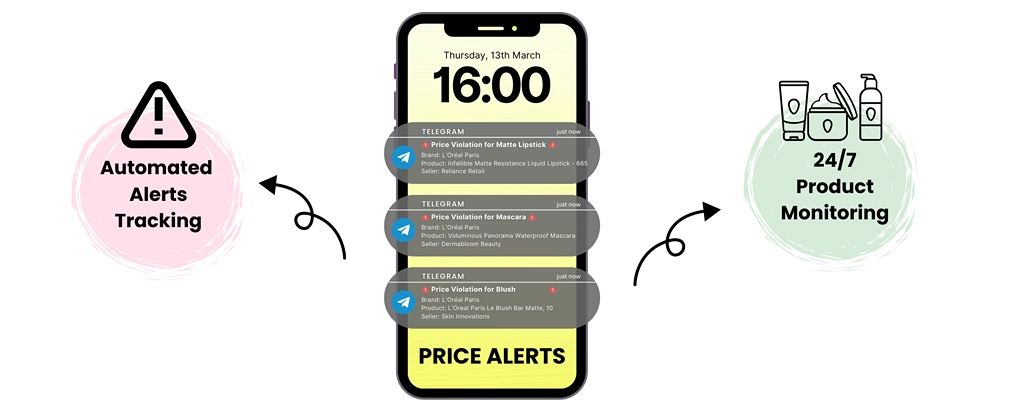
- Develop notification channels (email, SMS, webhook) for price drops.
Step 5: Scale and Maintain
- Containerize scrapers using Docker for easy deployment.
- Use task queues (Celery, Redis) to manage thousands of concurrent tracking jobs.
- Implement monitoring to detect broken scrapers when websites change their structure.
Warning: Building a truly universal price tracker for any website is an ongoing battle against anti-bot measures and requires significant DevOps and engineering resources to maintain.
Python Price Tracker: A Basic Working Example (For Developers)
For developers who want to build their own price tracker, here is a minimal working example using Python, Requests, and BeautifulSoup. This scrapes a static price from a hypothetical product page.
python
import requests
from bs4 import BeautifulSoup
import csv
from datetime import datetime
url = “https://example.com/product-page”
headers = {“User-Agent”: “Mozilla/5.0 (Windows NT 10.0; Win64; x64)”}
response = requests.get(url, headers=headers)
soup = BeautifulSoup(response.text, “html.parser”)
# Find the price element using its CSS selector
price_element = soup.select_one(“.product-price”)
if price_element:
raw_price = price_element.text.strip()
# Clean the price: remove currency symbols and commas
clean_price = raw_price.replace(“$”, “”).replace(“,”, “”).replace(“€”, “”)
timestamp = datetime.now().isoformat()
# Append to CSV file
with open(“prices.csv”, “a”, newline=””) as f:
writer = csv.writer(f)
writer.writerow([timestamp, url, clean_price])
print(f”Price recorded: {clean_price}”)
else:
print(“Price element not found – site structure may have changed”)
What this script does:
- Fetches the HTML of a single product page.
- Extracts the price using a CSS selector (.product-price).
- Cleans the price (removes currency symbols, commas).
- Appends the timestamp and price to a CSV file.
Limitations of this approach:
- No JavaScript rendering – dynamic sites will return incomplete HTML.
- No proxy rotation – your IP will be banned after repeated requests.
- No error handling for timeouts, CAPTCHAs, or site changes.
- No historical comparison logic – you would need to read the CSV and compare values.
The step up: Use Selenium or Playwright to render JavaScript. Add rotating residential proxies to avoid IP bans. Use Scrapy instead of Requests for larger projects. For production use, containerize with Docker and deploy on a schedule using cron or Airflow.
Docker price tracker example: A Dockerfile might look like:
dockerfile
FROM python:3.9-slim
WORKDIR /app
COPY requirements.txt .
RUN pip install -r requirements.txt
COPY scraper.py .
CMD [“python”, “scraper.py”]
Price Tracker API: Rather than building a scraper from scratch, many developers use a price tracking API – a service that handles the scraping infrastructure (proxies, CAPTCHAs, headless browsers) and returns clean price data via API calls. This removes the maintenance burden and is often more cost‑effective for business use cases. Full open‑source implementations are available on GitHub (search “price tracker” or “ecommerce price scraper”). Use 42Signals’ ecommerce price intelligence platform instead.
The Invisible Hurdle: Modern Websites Are Not Just HTML
If scraping were just about reading HTML, the story would end here. But the modern web is dramatically more complex. Many websites today rely heavily on JavaScript to load their content. When you visit such a site, your browser first receives a basic HTML skeleton, and then it runs JavaScript code to fetch the actual product data and prices, painting them onto the page dynamically.
A simple scraper that only reads the initial HTML would come up empty. It would see the skeleton of the page but miss the price entirely because it never executed the JavaScript. This is a common first hurdle for basic tracking tools. To overcome this, advanced systems use a technology called JavaScript rendering.
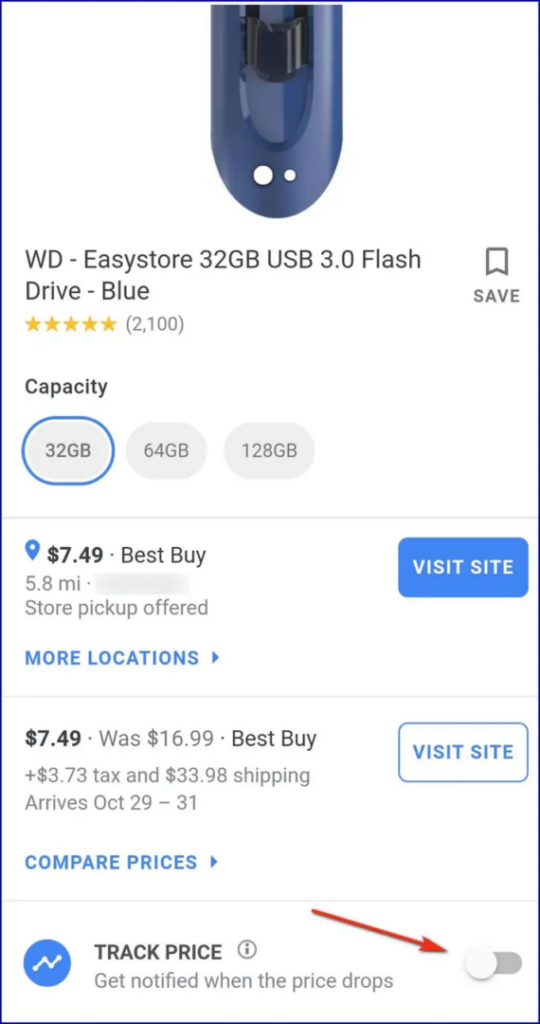
Image Source: Google Price Tracker
This involves using a “headless browser”, a real web browser like Chrome or Firefox that runs in the background without a user interface. The price tracking tool instructs this headless browser to visit the webpage, wait for all the JavaScript to finish loading and executing, and then scrape the fully rendered page. This ensures that even the most dynamic, modern websites can be monitored, making it a critical feature for a truly universal price tracker for any website.
Best Price Tracker Tools: Consumer and Business Options
| Tool | Type | Best For | Platforms Covered | Price History? |
| Google Shopping | Consumer (free) | Quick price alerts on major retailers | Google Shopping listings | No |
| Honey (by PayPal) | Consumer (free) | Coupon finding + price history | Major retail sites | Limited |
| Keepa | Consumer (free/paid) | Amazon price history in depth | Amazon only | Yes — extensive |
| CamelCamelCamel | Consumer (free) | Amazon price history and alerts | Amazon only | Yes |
| AliHelper | Consumer (free) | AliExpress price tracking | AliExpress | Yes |
| PriceHistory.app | Consumer (free) | Cross-platform price history | Multiple retailers | Yes |
| 42Signals | Business (paid) | Competitor monitoring at scale | E‑commerce platforms, brand sites, marketplaces | Yes + analytics |
How Do I Get Started with a Price Tracker?
The right starting point depends on your use case. If you are a consumer tracking a single product for personal shopping, start with a free browser extension like Honey or a dedicated Amazon tool like Keepa both are free and require no setup. If you are tracking prices across multiple retailers for deal hunting or price history research, PriceHistory.app covers a wider range of sites than Amazon-only tools. If you are a developer who wants to build a custom solution, the Python example in this guide is the right starting point, with the understanding that production use requires adding headless browser rendering and proxy rotation. If you are a business tracking competitor pricing across thousands of SKUs for commercial advantage, a purpose-built platform like 42Signals is the correct path, the infrastructure required to scrape at business scale makes building impractical for most teams.
The Arms Race: Overcoming Anti-Bot Detection
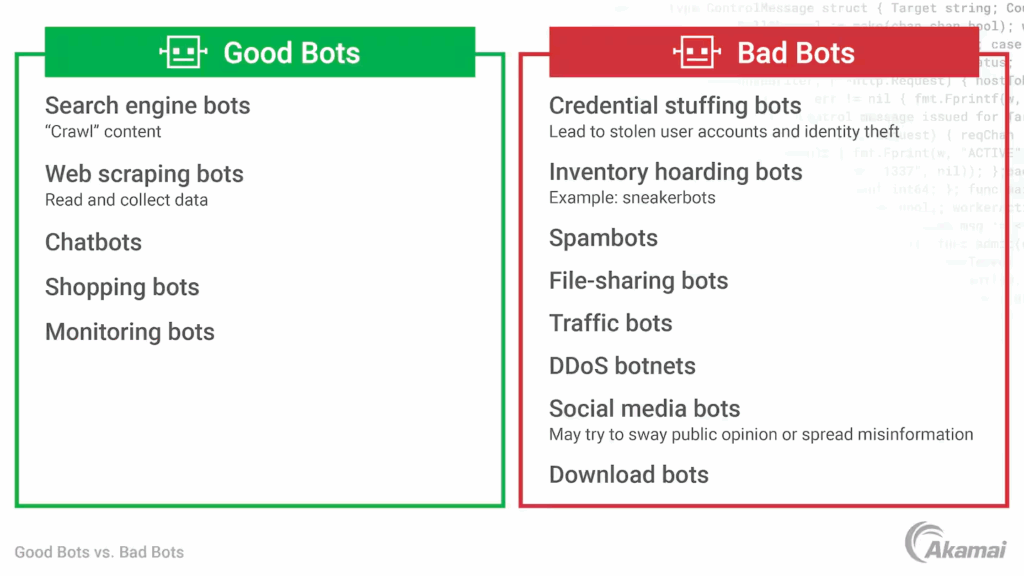
Image Source: Akamai
Websites, especially large retailers, are not naive. They know that bots, including friendly price trackers and malicious scrapers, are constantly visiting their sites. Excessive bot traffic can slow down the site for real human customers and compromise their business data. To fight back, they deploy sophisticated anti-bot detection systems.
These systems analyse visitor behaviour, looking for telltale signs of automation. They check things like the frequency of visits, the digital fingerprint of the browser making the request, and even the speed and pattern of mouse movements.
A bot that visits the same product page every 30 minutes from the same computer will be spotted and blocked almost instantly. This is where the technological arms race intensifies, and where premium tools separate themselves from basic ones.
A robust price scraping tool must therefore be designed to appear human. It must randomize its timing, manage cookies like a real browser, and mimic human interaction patterns. Failing to do so results in the tracker’s IP address being banned, rendering it useless. This cat-and-mouse game is a central challenge in the world of competitor monitoring.
The Real Cost of Price Crawling: Building vs. Buying
Understanding the cost of price crawler development and operation is critical. Here’s a breakdown of the true expenses:
Option A: Building Your Own System
| Cost Category | Description | Estimated Monthly Cost (after development) |
|---|---|---|
| Development Time | 2-3 senior developers for 4-6 months (one-time cost: $80k – $150k) | N/A |
| Proxy Network | Essential for reliability. Residential proxies cost $10-$30 per GB. | $500 – $3,000+ |
| Server Infrastructure | Cloud servers (AWS, GCP) to run scrapers and databases. | $300 – $2,000+ |
| CAPTCHA Solving | Third-party services charge per solved CAPTCHA. | $50 – $500+ |
| Maintenance & Updates | Dedicated developer time to fix broken scrapers. (20-30 hours/week) | $4,000 – $8,000 (salary) |
| Total (Ongoing) | Monthly operational cost, excluding dev salaries | $850 – $5,500+ |
Hidden Costs: Legal compliance, data storage, alert system development, and scaling challenges.
Option B: Buying a Service (e.g., 42Signals)
- Predictable Subscription: Typically $200 – $2,000/month based on features and volume.
- No Development Overhead: Zero upfront engineering cost.
- Built-in Reliability: Provider handles proxies, CAPTCHAs, and updates.
- Additional Features: Get analytics dashboards, competitor benchmarking, and MAP monitoring included.
Verdict: For most businesses, buying a specialized service offers superior ROI. Building is only justifiable if price tracking is your core product and you have the engineering bandwidth for a perpetual tech arms race.
What Is the Cost of a Price Tracker?
The cost of a price tracker varies enormously by use case. For consumers, the best tools (Honey, Keepa, CamelCamelCamel, Google Shopping alerts) are free. For developers building their own system, the upfront development cost is $80,000–$150,000 in engineering time, with ongoing operational costs of $850–$5,500 per month for proxies, servers, and maintenance. For businesses buying a commercial price tracking service, subscription costs typically range from $200 to $2,000 per month depending on the number of SKUs tracked, the number of competitor domains covered, and the analytics features included. For enterprise brands tracking tens of thousands of SKUs across multiple marketplaces with custom integrations, pricing is custom-quoted based on volume.
The Secret Weapon: How Proxy Networks Enable Global Monitoring
So, how does a price tracker avoid getting its IP address banned while monitoring prices multiple times a day? The answer lies in a proxy network. A proxy server acts as an intermediary. Instead of the tracker sending a request directly from its own server to the target website, it sends the request through a proxy server. The target website then sees the request coming from the proxy’s IP address, not the tracker’s original one.
A premium service does not use just one proxy. It uses a vast, global network of thousands, sometimes millions, of residential and data centre IP addresses. For each request to a website, the price tracker for any website can rotate through these proxies, making it appear as if the visits are coming from different computers all over the world. This distributes the load and makes it incredibly difficult for anti-bot detection systems to pinpoint and block the activity, ensuring consistent and reliable data extraction.
Choosing Proxies for Price Tracking
Not all proxies are equal. For serious price tracking, you need to understand the differences:
| Proxy Type | Description | Cost | Best For |
| Residential proxies | IP addresses assigned to real home internet connections. Hardest to detect but most expensive. | $10–$30 per GB | Large e‑commerce sites (Amazon, Walmart, Target) |
| Datacenter proxies | IPs from cloud providers. Cheap but easily blocked. | $0.50–$2 per GB | Low‑priority or less protected sites |
| Rotating proxies | Automatically assign a new IP for each request. | Varies | High‑volume scraping where each request looks like a new user |
| Static proxies | Maintain the same IP across requests. | Varies | Sessions where consistency matters (e.g., logged‑in state) |
Rotating residential proxies are the industry standard for serious price tracking. They mimic real users from diverse locations, making anti‑bot detection much harder.
Provider evaluation criteria:
- Pool size (millions of IPs is better than thousands)
- Geographic coverage (do they cover the countries where your target sites operate?)
- Success rate on major retail sites (ask for a trial)
- Pricing model (per GB vs. per request – per GB is usually more predictable)
Google Shopping specifically (SERP scraping): Google is one of the most aggressively protected targets. Scraping Google Shopping results requires residential proxies with very careful rate limiting. Dedicated SERP APIs (like SerpAPI, ScaleSerp) are often more reliable than raw proxy + scraper setups because they handle the anti‑bot complexity for you.
Price Tracking for Inflation / Cost Monitoring
Price tracking tools have also become a practical personal finance tool during periods of inflation. By setting alerts across regularly purchased household items, subscriptions, and recurring purchases, consumers can spot price increases early and make proactive substitution decisions.
Several dedicated tools track software subscription price changes specifically — particularly useful as SaaS pricing has become increasingly complex and opaque. For example, if you want to monitor whether your project management tool or CRM has quietly increased its monthly fee, price tracking alerts can notify you immediately. This use case transforms price tracking from a shopping convenience into a household budget management tool.
Ready to Take the Next Step?
See how our solutions can help you achieve your goals and drive measurable results.
Building a Price Tracker for Any Website and the Role of CAPTCHA Solving
Even with proxies and human-like behavior, a tracker will occasionally hit the final boss of bot detection: the CAPTCHA. Those “I’m not a robot” checkboxes and image identification tests are specifically designed to stop automated systems. So how can an automated system solve them?
This is where CAPTCHA solving comes in. Advanced systems have integrated methods to handle these challenges. Sometimes, this involves using machine learning models trained to identify traffic patterns that are likely to trigger a CAPTCHA and avoid them. In other cases, for particularly stubborn CAPTCHAs, some services employ a hybrid approach. They can route the CAPTCHA to a human-solving service, where a real person solves the puzzle, allowing the data collection process to continue.
While fully automated CAPTCHA solving is a complex field, the ability to handle these interruptions is a key differentiator for a reliable price scraping tool. It ensures that the data pipeline remains unbroken, even in the face of the toughest defenses.
From Raw Data to Actionable Insight: Cleaning and Structuring Information

Once the price tracker has successfully navigated all the technical barriers and extracted the raw number from the website, its job is not over. The data must be cleaned and structured. A price on a website might appear as “$1,299.99” or “1.299,99 €” or “Out of Stock.”
The tracking system must parse this string of text, isolate the numerical value, account for the currency, and handle various states like discontinued items or stock-outs. This processed data is then stored in a database with a precise timestamp. This meticulous process of data extraction and normalization is what transforms a raw, messy text snippet into a clean, actionable data point on a price history chart.
According to a 2020 report by Anaconda, data scientists spend nearly half their time on data preparation and cleaning tasks, highlighting the critical importance of this step. A sophisticated tracker automates this heavily, ensuring the insights you see are based on accurate, clean data.
Why a Price Tracker for Any Website Is a Game-Changer for Ecommerce Brands
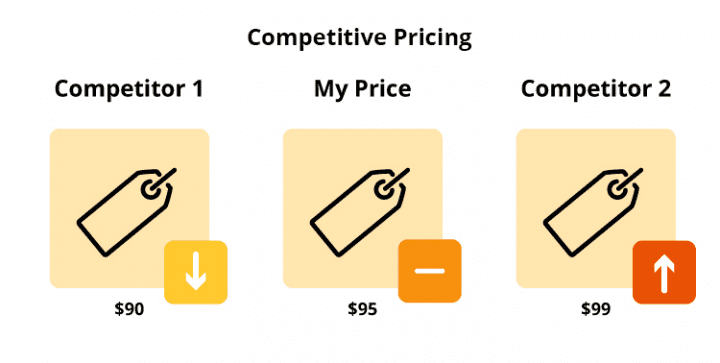
For businesses, this technology is not just about getting a good deal on a new monitor. It is a critical tool for strategic competitor monitoring. Imagine being able to track the pricing strategy of every one of your main competitors across dozens of their key products, in real-time.
You can see when they launch a sale, how they price products relative to yours, and how they react to your own price changes. This intelligence allows for dynamic pricing strategies, optimized promotional campaigns, and a deeper understanding of the market landscape. A universal price tracker for any website democratises this power, making what was once a costly and manual business intelligence operation accessible and scalable. In a fast-paced e-commerce environment, this agility is not just an advantage. It is a necessity for survival and growth.
Beyond just reacting, this data informs long-term strategy. By analyzing historical price data collected through consistent data extraction, you can identify seasonal trends, predict your competitors’ future promotions, and make smarter inventory decisions.
For instance, if you notice a rival consistently drops prices on a particular item every six weeks, you can plan your marketing and stock levels accordingly. This proactive approach transforms raw data into a strategic asset. In a fast-paced e-commerce environment, this level of insight and agility is not just an advantage. It is a necessity for survival and growth.
Competitor Price Monitoring: The Business Use Case
What competitor price monitoring is: Systematic, automated tracking of competitors’ prices across their entire product catalogue, not just individual items. Unlike a basic price tracker that follows a single product URL, competitor price monitoring scans thousands of SKUs across multiple competitor domains simultaneously.
What it tells you that a standard price tracker does not:
- Promotional cadence – When do competitors run sales? How often? How deep are their discounts?
- Price positioning – How does your pricing compare to rivals on identical or similar SKUs?
- Response patterns – How do competitors react when you change your prices?
- Category-level strategy – Are they competing on value, premium, or loss-leader pricing?
How it works at scale: A competitor monitoring tool crawls thousands of product pages across multiple competitor domains using rotating proxies, JavaScript rendering, and automated data extraction. It normalizes the data (cleaning currencies, units, and promotional flags) and surfaces it in a dashboard with real-time alerts for significant price moves.
Platforms like 42Signals are purpose-built for this use case — tracking competitor pricing across e-commerce platforms, marketplaces, and brand websites simultaneously, with the analytics layer to turn raw price data into strategic decisions.
Price Tracker vs. Price Monitoring: Understanding the Difference
While often used interchangeably, these terms represent different levels of sophistication:
- Price Tracker (Consumer Tool):
- Focus: Tracks a few specific products for personal shopping.
- Example: Browser extensions like Honey or Keepa.
- Scale: Limited to a handful of URLs.
- Output: Basic price drop alerts.
- Price Monitoring / Web Price Crawler (Business Tool):
- Focus: Systematic tracking of thousands of products across competitors.
- Example: Platforms like 42Signals.
- Scale: Enterprise-level, monitoring entire categories or marketplaces.
- Output: Analytics dashboards, pricing intelligence reports, competitive insights, and automated alerts for teams.
A universal price tracker bridges these concepts—it’s the underlying technology that enables both, but business-grade solutions add layers of analysis, scalability, and integration that consumer tools lack.
The Ethical Dimension: Responsible Data Collection
It is also important to address the elephant in the room: is this all legal and ethical? The general rule of thumb is that publicly accessible data on a website, such as a product price, is considered fair game for collection. However, responsible operators of a price scraping tool always prioritize respectful data collection. This means they configure their systems to avoid overwhelming a website’s servers with too many requests per second, which could be construed as a denial-of-service attack.
The use of proxy networks and sophisticated timing is not just for evasion. It is also a method for being a good citizen on the web, distributing load in a way that mimics natural human traffic. Furthermore, reputable services strictly adhere to the rules outlined in a website’s robots.txt file, a standard used by websites to communicate their preferences to web crawlers. Understanding this ethical layer is crucial. It highlights the difference between a tool built for robust, legitimate competitor monitoring and one designed for malicious harvesting.
Ready to Take the Next Step?
See how our solutions can help you achieve your goals and drive measurable results.
Top Features to Look for in a Professional Price Tracker
Whether building or buying, ensure your solution has these capabilities:
- JavaScript Rendering: Can it track modern, dynamic websites (React, Angular, Vue.js)?
- Global Proxy Network: Does it use residential proxies to avoid blocks and provide geo-specific pricing?
- High Frequency & Reliability: Can it check prices hourly (or more) with 99%+ uptime?
- Data Accuracy: Does it clean and normalize data (handle currencies, out-of-stock signals, bundle deals)?
- Alert Flexibility: Can you set alerts for price changes, stock status, or competitor moves?
- Historical Data & Analytics: Does it provide charts, trend analysis, and price forecasting?
- API Access: Can you integrate the data into your own systems (ERP, PIM, repricing tools)?
- Scalability: Can it track 100 or 100,000 products without performance degradation?
- Compliance: Does it respect
robots.txtand implement ethical scraping practices? - User-Friendly Interface: Is the data presented in clear dashboards for non-technical team members?
How to Use Google’s Built-In Price Tracker
Google Shopping has a native price tracking feature that many shoppers overlook. When viewing a product on Google Shopping, users can click “Track price” to receive email alerts when the price drops.
How to set a Google price alert:
- Search for the product on Google (e.g., “wireless headphones”).
- Click the Shopping tab to see product listings.
- Select a listing from a retailer.
- Look for the “Track price” button (may appear as a bell icon or “Track” link).
- Sign in with your Google account to activate alerts.
Limitations of Google price tracking:
- Only works for products listed on Google Shopping (not all retailers are included).
- Covers a limited number of retailers compared to dedicated tools.
- Does not provide price history charts or trends.
- Alerts are sent via email only, no push notifications.
When to use Google vs. a dedicated tracker: Google price alerts are sufficient for casual one-off purchases where you just want a heads-up on a single item. For serious deal hunting, cross-site comparison, or price history analytics, dedicated tools like Keepa, CamelCamelCamel, or professional platforms offer deeper functionality.
More Than Just a Tool: It is a Symphony of Technology
What seems like a simple concept, “watch a price on a website”, is, in reality, a symphony of advanced technologies working in perfect harmony. From the basic principle of web scraping to the advanced use of headless browsers for JavaScript rendering, and from the strategic use of proxy networks to the clever evasion of anti-bot detection, a modern universal price tracker for any website is a feat of software engineering.
It is built to navigate the evolving complexities of the modern web to deliver one simple, powerful thing: certainty. The certainty that you are getting the best deal as a consumer, and the certainty that you have the data to compete effectively as a business. The next time you receive a price drop alert, you will appreciate the incredible, invisible technological dance that made it possible.
If you’d rather not build your own price tracker for any website, 42Signals handles the infrastructure scraping, proxies, CAPTCHA handling, data normalization, and analytics, so you get clean competitor pricing data without the engineering overhead. Schedule a demo to see how it tracks your competitors’ pricing across Amazon, Walmart, and your direct retail channels.
Frequently Asked Questions
What is a price tracker for any website?
A price tracker for any website is software that automatically monitors product prices across online retail sites — not just a single platform like Amazon, but any website that publicly displays pricing. It works by using web scraping to fetch product pages, headless browser rendering to process JavaScript-heavy sites, and rotating proxy networks to avoid IP blocks. The tracker stores price data at regular intervals, compares new prices against historical data, and sends alerts when a price drops below a threshold you set. For consumers, this means never missing a sale. For businesses, it means continuously tracking competitor pricing across thousands of SKUs without manual effort.
How do I track price changes on websites?
To track price changes on websites, you have three main options depending on your needs. For individual products on major retail sites, free consumer tools like Keepa (Amazon), CamelCamelCamel (Amazon), or PriceHistory.app (multiple retailers) require no setup and send email alerts when prices drop. For custom tracking of any specific URL, browser extensions like Honey detect price drops when you visit a product page. For developers wanting to track any website programmatically, a Python scraper using BeautifulSoup or Selenium can check a URL on a schedule — see the working example in this guide. For businesses tracking competitor pricing at scale across thousands of products, a professional platform like 42Signals is the right approach, as it handles the proxy rotation and data normalization required to scrape reliably at commercial volume.
What is the best website price tracker?
The best website price tracker depends on your use case. For Amazon-only tracking, Keepa is the most comprehensive free option — it shows full price history charts, sets alerts, and tracks third-party seller prices. For tracking across multiple retail sites, PriceHistory.app and CamelCamelCamel (for Amazon) offer broader coverage. For consumers wanting coupon finding alongside price tracking, Honey (by PayPal) is the most user-friendly option. For businesses tracking competitor pricing across thousands of SKUs and multiple domains simultaneously, 42Signals is purpose-built for commercial-scale price monitoring with analytics, MAP compliance tracking, and alerting built in. There is no single best tool for all uses — match the tool to the scale and purpose of your monitoring.
How much does a price tracker cost?
Consumer price trackers (Honey, Keepa, CamelCamelCamel, Google Shopping alerts) are free. Building your own price tracker for any website costs $80,000–$150,000 in upfront engineering time plus $850–$5,500 per month in ongoing infrastructure (proxies, servers, CAPTCHA solving, developer maintenance). Buying a business-grade price monitoring service typically costs $200–$2,000 per month for mid-market brands, with enterprise pricing custom-quoted above that based on SKU volume, competitor coverage, and integration requirements. For most businesses, a purchased service is more cost-effective than building, because the engineering and maintenance costs of a reliable, scalable scraper consistently exceed the subscription cost of a commercial platform.
What is a web price tracker and how is it different from an Amazon price tracker?
A web price tracker (also called a universal price tracker) can monitor product prices on any publicly accessible website — general retail sites, brand DTC sites, marketplace platforms, and comparison shopping engines. An Amazon price tracker is a narrower tool designed specifically for Amazon’s product listings and price history. The key practical difference: Amazon-specific tools like Keepa and CamelCamelCamel are deeply integrated with Amazon’s data structure and can show ASIN-level price history, Buy Box ownership changes, and third-party seller data. Web price trackers sacrifice that Amazon-specific depth for broad cross-platform coverage. For businesses that sell primarily on Amazon, a dedicated Amazon tracker is often more useful. For businesses that need to monitor competitor pricing across multiple channels — their own website, Amazon, Walmart, and regional marketplaces — a universal web price tracker or professional monitoring platform covers the full picture.
Can I build a price tracker for any website using Python?
Yes — the basic version is straightforward to build in Python using the Requests library to fetch pages and BeautifulSoup to extract price data. The working code example in this guide shows a minimal implementation that scrapes a static price from a product page and logs it to a CSV file. However, a production-ready price tracker for any website requires significantly more: Selenium or Playwright for JavaScript rendering (most modern retail sites require this), rotating residential proxies to avoid IP bans after repeated requests, error handling for site structure changes and CAPTCHAs, a database for historical price storage and comparison logic, and a scheduler (cron or Airflow) to run the scraper at regular intervals. The jump from the basic Python example to a production system that reliably tracks prices across multiple websites requires substantial engineering investment — which is why most businesses find that buying a commercial service delivers better ROI than maintaining their own scraper infrastructure.